Skip to content
logo logoSelf Service
Sign In Sign Up
  • Home
  • Knowledgebase
Back

How to Update Email Address from Personal Domain to Business Domain on Support

Updated 10/30/2024 01:54:53 PM by hvuser
  • PDF
  • Print
  • Share
    • Facebook
  • Copy To Clipboard
  • Collapse All Expand All

Content

Objective

Update email address from a public domain (@gmail, @yahoo, @live...) to a business domain.  The use of business domain is required for customer accounts, in order to gain more access to additional features on Support Connect such as: My Products, My Sites, Technical Bulletins, Knowledge and Cases. 

Please note if you have already registered with a business domain, you cannot change it on Support Connect. Please contact us for further assistance. 

Environment

  • Support 

Procedure

  1. Log in to Support 
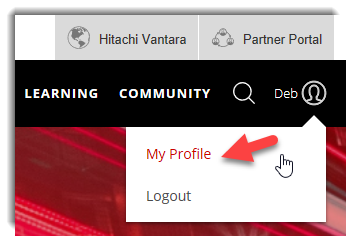
  2. Hover over Welcome (your name)! and click My Profile
    090240412102455.png
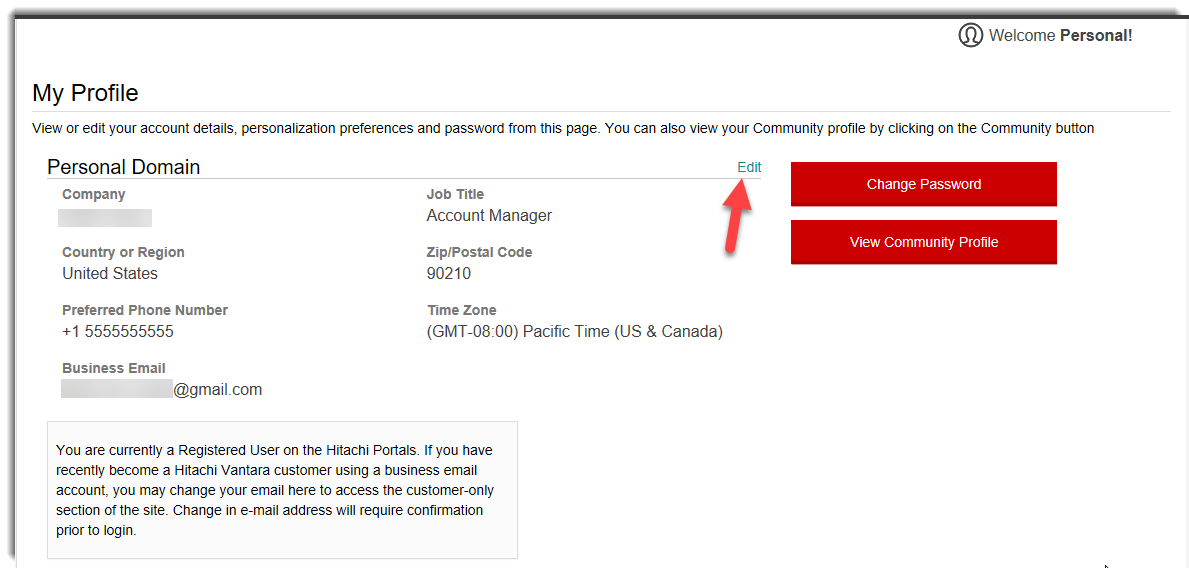
  3. Click Edit.
    090240412102456.png
  4. Populate the Business Email field with your business email address and click save.
    090240412030112.png
  5.  A banner will appear toward the top of the page notifying you a validation email was sent. Be sure to click the validation link within 24 hours in order to access Support Connect using your updated email address. 
    090240412030113.png
  6. Navigate to email from Hitachi Vantara and click Activate Now
  7. You will be prompted to login
  8. After logging in, you may be prompted to select your company organization. Select the appropriate one and click continue.
    090240412030115.png
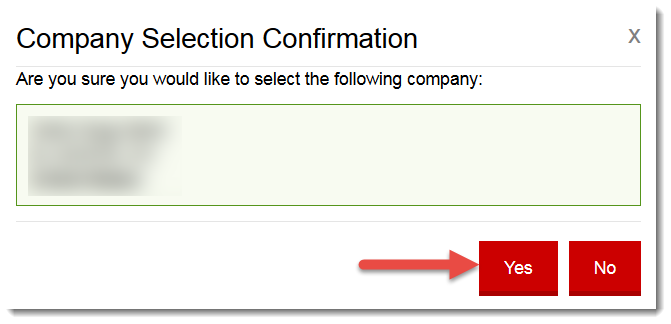
  9. Confirm your selection by clicking yes
    090240412004441.png

Additional Notes

Once registered using a personal email domain you will receive an email from Hitachi Vantara stating you are a guest user and in order to gain full access to Hitachi sites you can register with a business email address.
090240412030114.png

CXOne Metadata

Support Connect, Email,customer, Personal Domain, Business Domain, Registered User

Keywords: https://knowledge.hitachivantara.com/Support_Information/Support_Website/How_to_Update_Email_Address_from_Personal_Domain_to_Business_Domain_on_Support

Related Solutions

  • Certain mod_proxy Configurations on Versions of Apache HTTP Server Could Allow Unauthorized Access
  • Data Instance Director Support Questions
  • BCM Data Collection
  • How to manage your Hitachi Vantara MFA Factors via SSO Profile
  • How to Easily Enable HTTPS/SSL on a Brocade Fabric OS Based Switch with CA
Solution ID
242403050014624
Last Modified Date
10/30/2024 01:54:53 PM
Attributes
Page Privacy and Permission Assignment
  • Page Privacy: Private
  • Page Level Permissions: Anonymous; Employee; Service Partner; Customer; IT; eServices
  • Article: howto
  • Pagetype: knowledgearticle
Taxonomy
  • Support Information > Support Website
Collections
  • Guest (Public)

Solution to Copy:

Copy to Clipboard

Failed to download PDF file.

Problem creating pdf file for the solution: 242403050014624. Retry after some time.
Close

Acknowledged.

Thank you for acknowledging that you have read and understood this solution.

Failure.

Unable to acknowlege. An error occurred.
View More...
Knowledge
  • Knowledgebase
Helpful Links
  • Community
  • Product Documentation
Upland RightAnswers | Self Service - 2025R2.3-01-6c2ece7
© Sun Jun 21 06:55:05 EDT 2026 Upland Software, Inc. All Rights Reserved